
haskell-lens-operator-onboarding
This post is also available as a literate haskell doc.
Lenses are immensely useful to the Haskell programmer, but suffer from a discovery problem - without enough exposure or experience, it’s hard to know which operator to use in a given situation. This post provides explanations for common lens operators as well as example-driven references for developers just getting started with lenses.
There is prior art for lens-related reading - we’ve pulled together a short list at the bottom of this post, including one from another Urbinite. The Lens Library itself also provides documentation and usage examples, once you know what you’re looking for. The Lens website is a great place to start.
The motivation for this post is an attempt at smoothing out and condensing the
Lens learning curve. Using Lens requires familiarity with several new
concepts encoded in a handful of new operators. The learning process was
frustrating - I knew the problems I was facing had a simple answer. I spent too
long staring blankly at Lens’s at/ix and folded operators, frustrated
that all I wanted was to list the values in my HashMap. Lens makes this very
easy, but only if you’ve done it before.
So what the heck is a lens?
Section titled “So what the heck is a lens?”Control.Lens is a Haskell package
written by Edward Kmett. It provides ‘Optics’ for
working with data structures; these optics let you access and update values
(view and set) as well as modify the structure itself (for example,
converting a HashMap into a HashSet).
Within the Control.Lens package, a Lens itself is the place to start. A lens
can be defined as both a Getter and Setter for the same data structure. The
same lens can then be used in different contexts to view or set a value.
This is useful on its own, but the real power comes from composition - multiple
lenses can be composed together and used as one, allowing you to view or set
arbitrarily nested structures with ease. If this is not sticking, fear not -
we’ll get into the nitty-gritty details in the examples below.
The Lens package is very large - in this post, we’re only going to cover
examples for the following:
view(^.),preview(^?), and (^?!)set(.~)over(%~)atandixtoListOf(^..) andfoldedhasandhasn't
These together cover many use-cases, and will speed up your Haskell productivity. We’ll visit some more advanced operators in a future post. If there are any you’d like covered in a similar way, please leave a comment!
Search
Section titled “Search”First things first - you NEED instant operator documentation lookup. If you’re
on a Mac, this can be done via Alfred and Dash. Setup is on your own, but to
motivate you, searching for a Lens operator like ^. can be done via
[cmd]+[space] hs ^..
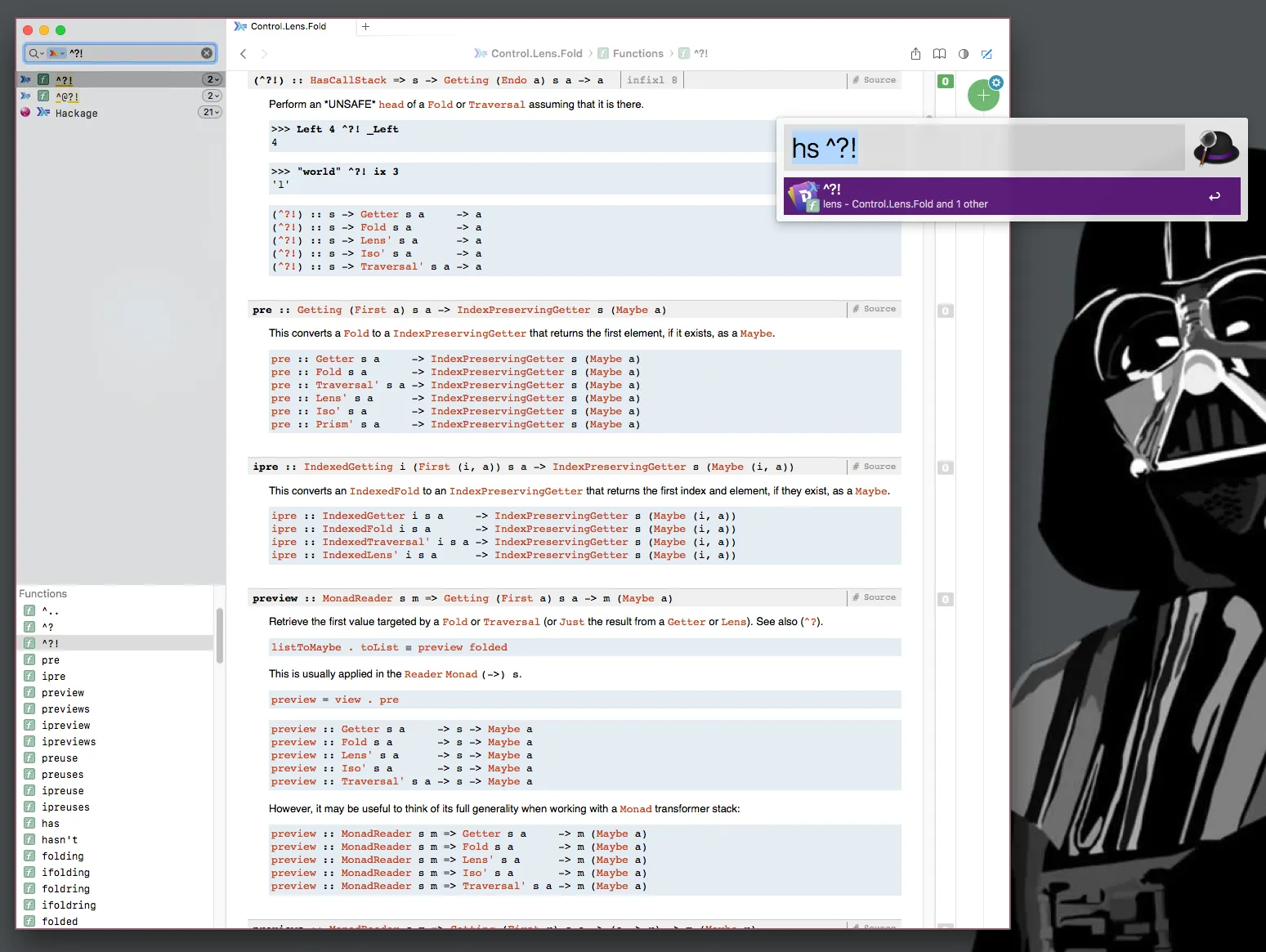
^ Searchable Lens documentation on OSX via Alfred and Dash integration.
This workflow feature is crucial for quickly looking up operators you don’t
know, which should help you feel less like !?!?!?, and more like “Oh, ^?! is
just an unsafe view on Maybe a”.
Tooling like this is critical for searching for obscure operators and super
generic function names. view and set are not quite specific enough for today’s
Google.
If an OS built-in tool is not available, the “Index” pages on
Hackage can also make quick work of finding an
operator exposed by a library. Here’s the index page for the Lens
library.
Literate Haskell
Section titled “Literate Haskell”This was originally written as a Literate Haskell file (.lhs), which can be compiled and run like any other Haskell file. The source document can be found here. See the Readme in that repo for instructions for running it yourself.
Our Data Structures
Section titled “Our Data Structures”Let’s create a few data types to work with.
-- | A newtype wrapper to force UserNames to be labeled, and prevent us from-- passing the wrong type of name around.newtype UserName = UserName Text deriving (Show, Eq)newtype PetName = PetName Text deriving (Show, Eq)
-- | A type alias to improve the readability of our types.-- An inventory is a HashMap with a Text key and Item value.type Inventory = HM.HashMap Text Item
-- | A User record.data User  = User  { _userName :: UserName  , _userScore :: Int  , _userPet :: Maybe Pet  , _userInventory :: Inventory  } deriving (Show, Eq)
data Pet  = Pet  { _petName :: PetName } deriving (Show, Eq)
-- | An Item record.data Item  = Item  { _itemValue :: Int  , _itemWeight :: Int  } deriving (Show, Eq)
Our Lenses
Section titled “Our Lenses”Now let’s write some lenses for our data types.
Remember that lenses can be defined as a Getter and a Setter between two structures.
-- | A lens from a User to Text.---- Written quite explicitly with getter and setter helper functions to expose-- Lens's nature.userName :: Lens' User UserNameuserName = lens getter setter  where    getter user = _userName user    setter user newName = user { _userName = newName }
score :: Lens' User Intscore = lens _userScore (\user newScore -> user { _userScore = newScore })
-- | Note that this lens targets a 'Maybe Pet'.pet :: Lens' User (Maybe Pet)pet = lens _userPet (\user maybePet -> user {_userPet = maybePet})
-- | Single letter vars, seriously? Yep.inventory :: Lens' User Inventoryinventory = lens _userInventory (\u i -> u { _userInventory = i })
------------------------------------------------------------------------------
petName :: Lens' Pet PetNamepetName = lens _petName (\p n -> p { _petName = n })
------------------------------------------------------------------------------
value :: Lens' Item Intvalue = lens _itemValue (\i v -> i { _itemValue = v })
weight :: Lens' Item Intweight = lens _itemWeight (\i w -> i { _itemWeight = w })
Advanced Usage: Note that it is possible to generate lenses with Template Haskell! We’re not going to get into that magic in this post - I recommend making sure you know how to write these yourself first.
Great. Let’s put these lenses to work.
view (^.), preview (^?), and (^?!)
Section titled “view (^.), preview (^?), and (^?!)”view is used for applying the Getter in your lenses to the a of your
choice.
Mnemonic: The use of the carrot
^is quite literal - it’s an upside down ‘v’, as inview. Beyond that,view|^.vspreview|^?is used to differentiateafromMaybe a.
If that’s not mnemonic enough, wait until we get to over’s use of % as a pun
on mod(ulo/ify). You’ll be all, “:smh: Ed Kmett, you are one cheeky operator.”
viewExamples :: IO ()viewExamples = do  let bob = User (UserName "Bob") 42 Nothing HM.empty
  print "Bob's name is: "  print $ view userName bob  -- UserName "bob"  print $ bob ^. userName  -- UserName "bob"
  print "Bob's score is: "  print $ view score bob  -- 42  print $ bob ^. score  -- 42
The best part about lenses, of course, is that they compose!
But what’s this? _Just? preview and ^?!? Did you just drop a new operator
out of nowhere? Welcome to Haskell, where the operators are fun toy things
anyone can drop in anywhere! Whenever you see a new operator, I encourage you to
laugh maniacally. It might help.
preview (and its infix version (^?)) are similar to view and (^.). The
difference is that preview lets us walk over Folds and Traversal, in this
case, the Maybe Pet. _Just is a Prism providing a Traversal for
targeting the Just a of a Maybe a. I’m sure you caught all of that. More
examples please!
We’re not going to dig heavily into
Folds,Traversals, orPrismsthemselves in this post. Rather, we’ll stick close to usage examples, and learn enough practicalLensknowledge that exploring those on your own later is a little more sane.
previewExamples :: IO ()previewExamples = do  let maybeIntA = Just 1  -- Have to tell the compiler this was a 'Maybe Int' for it to be printable      maybeIntB = Nothing :: Maybe Int
  print "maybeIntA"  print $ maybeIntA ^? _Just  -- Just 1  print "maybeIntB"  print $ maybeIntB ^? _Just  -- Nothing
  let justiceCity = Just 1      crashCity = Nothing :: Maybe Int
  print "Unwrap this Maybe Int or die trying!"  print $ justiceCity ^?! _Just  -- 1  print "Crash city!"  -- print $ crashCity ^?! _Just  -- This will throw an 'empty fold' exception. `^?!` can be useful for  -- forcing Maybes to unwrap when writing tests.
I don’t know if there’s a named version for ^?!. Maybe it’s unsafePreview?
I’m sure there are plenty of snarky view/preview related extended metaphors
to explore. viewbang? Maybe?
set (.~)
Section titled “set (.~)”set lets us update values on our data structures, using the same lenses we
used to view those values.
The .~ (tilda) should be read similar to the = operator in an imperative
language - it sets the value on the right to be the target of the lens, and
returns the updated object.
Mnemonic:
.~as a kind of side-ways ‘s’. Seriously.Advanced Lens Note:
=is often swappable for~lens operators when working in aStateTcontext.
Let’s check out some set examples.
setExamples :: IO ()setExamples = do  let bob = User (UserName "bob") 0 Nothing HM.empty
  print "Bob, with an updated score"  print $ set score 42 bob  -- User {_userName = UserName "bob", _userScore = 42, _userPet = Nothing, _userInventory = fromList []}  print $ (score .~ 42) bob  -- User {_userName = UserName "bob", _userScore = 42, _userPet = Nothing, _userInventory = fromList []}
  -- print bob with score set to 42  print $ bob & score .~ 42  -- User {_userName = UserName "bob", _userScore = 42, _userPet = Nothing, _userInventory = fromList []}
What’s this? An ampersand? &?!? Did you laugh like a super villain? I hope you
did.
If you ask a seasoned Haskell Lenser what this & is all about, they’ll say,
oh, it’s just the reverse application operator, duh. It’s an inverted $.
The & makes updating an object with set|.~ easier. The advice I got was to
read it as “with”. That last line should read: “print bob with score set to 42”.
You know what else is cool? You can chain &s to update multiple targets on the
same object. Mind blown, amirite?
fancySetExamples :: IO ()fancySetExamples = do  let bob = User (UserName "bob") 0 Nothing HM.empty
  -- check out this multi-line string, why don't ya?  print "Bob changes his name to 'Bill'\        \, updates his score, and now owns Jeff's pet fish,\        \who is named Fitzgerald."  print $    bob    & userName .~ (UserName "Bill")    & score .~ 50    & pet ?~ (Pet (PetName "Fitzgerald"))  -- User {_userName = UserName "Bill", _userScore = 50,  --       _userPet = Just (Pet {_petName = PetName "Fitzgerald"}),  --       _userInventory = fromList []}
  -- note the `?~` - any guesses what that's doing?  -- These two are equivalent:  print $ bob & pet .~ Just (Pet (PetName "Fitzgerald"))  print $ bob & pet ?~ (Pet (PetName "Fitzgerald"))
So now you can view and set with lenses, and compose lenses arbitrarily.
Remember that setting is not just an “update,” but at times a “delete,”
depending on the lens - we’ll see an example of that when we get to at.
But first! You probably want something a little more flexible than set - say
you wanted to increment Bob’s score, but don’t want to use lenses multiple times
to view then add to it. (Let’s also say you didn’t know Ed Kmett already wrote
+~ for this exact use-case).
over (%~)
Section titled “over (%~)”over (%~) is like set (.~), but takes a function from a -> b rather
than just b. That way you can pass a function rather than a value to replace
whatever the target of the lens is.
Mnemonic: I alluded to the theory behind the
%earlier - this is yourmodoperator, used as a kind of nerdy pun from ‘modulo’ to ‘modify’. Yep.
overExamples :: IO ()overExamples = do  let fitz = Pet (PetName "Fitz")  let bob = User (UserName "bob") 0 (Just fitz) HM.empty
  print "Bob scores a point. Way to go, Bob."  -- These all print bob with a score incremented by 1.  print $ bob & score %~ (\sc -> sc + 1)  print $ bob & score %~ (+1)  print $ over score (+1) bob  print $ bob & score +~ 1
  -- Walk to Bob's fish, update its name  let bobWithFitzy = bob & pet . _Just . petName %~        (\(PetName n) -> PetName (T.concat [n, "y"]))  print $ bobWithFitzy ^? pet . _Just . petName  -- Just (UserName "Fitzy")
over is pretty handy! I hit a use-case for wrapping errors the other day that
I rather liked:
-- StorageError in a module somewherenewtype StorageError = StorageError Text deriving (Eq, Show)
-- WebError wraps storage Errordata WebError  = WebTextError Text  | WebStorageError StorageError  deriving (Eq, Show)
-- Let's convert an 'Either StorageError a' to an 'Either WebError a'moreOverExamples :: IO ()moreOverExamples = do  let badStorageResponse =        Left (StorageError "fail!") :: Either StorageError Text      goodStorageResponse =        Right "datadata" :: Either StorageError Text
  -- Wrap the error in WebStorageError if it's a `Left StorageError`  print $ over _Left (\stErr -> WebStorageError stErr) badStorageResponse  print $ over _Left WebStorageError badStorageResponse  print $ badStorageResponse & _Left %~ (\stErr -> WebStorageError stErr)  print $ badStorageResponse & _Left %~ WebStorageError  -- Left (WebStorageError (StorageError "fail!"))
  -- This passes the 'Right Text' through just fine.  print $ over _Left WebStorageError goodStorageResponse  -- Right "datadata"
The use of over above uses Lens’s _Left Prism to target the Either’s Left a cases, and apply the function to that target if a target is found. If it’s
Right b, no target is found, and the object is returned unmodified.
at and ix
Section titled “at and ix”at and ix are for things that are indexed. Maps, HashMaps, Lists -
collections with keys or indexes. at and ix are some of my favorite
‘Optics’ - once they are in your repertoire, you’ll be hella annoyed when you
have to work with indexed structures in other languages.
at and ix are roughly the same, with a key difference - ix is a Traversal,
while at is a Lens. You don’t know what a Traversal is? Geez, you weren’t born
spouting Category
Theory?
You probably didn’t even know Redux is just a big Monadic Klieisli composition
(>=>). Even Fitzgerald knows that, and he’s just a goldfish.
Traversals are different from Lenses (and Folds) in this context because a
Traversal cannot change the structure of the thing being traversed - it can
adjust the values in-place, but it cannot add or remove elements. Thus, Ix makes
for more convenient in-place adjustments, while At is useful for adding and
removing elements.
You may be wondering why we don’t just us at for everything - indeed, you can
if you’d like. However, at is a lens to Maybe a, while ix is a traversal
to a. It’s the ?~/^? to your .~/^. Ix-y goodness. at requires you
to use a _Just or a preview/?~, which is sometimes more verbose than is
necessary.
A more practical reason is that, sometimes, at cannot be legally implemented.
You may write a custom data structure for which the Lens laws are not
satisfied with at (this happened to us at Urbint!). Because ix and
Traversals cannot modify the structure itself, there are fewer requirements to a
valid implementation.
Mnemonic:
atis named such because it refers to an element “at” a key, whileixis said to represent the “i-th” element in a structure. Both, however, can take keys of any type, as long as you implement the required type classes for that key.
Enough jabbering. Let’s see what at and ix can do!
atIxExamples :: IO ()atIxExamples = do  -- Yep, you can use apostrophes in var names. Not that you should...  let bob'sInventory = HM.fromList [ ("gold", Item 99 10)                                    , ("silver", Item 10 9)                                    ]      bob = User (UserName "bob") 42 Nothing bob'sInventory
  print "Printing Bob's gold value"  print $ bob ^? inventory . at "gold" . _Just . value  -- Just 99  print $ bob ^? inventory . ix "gold" . value  -- Just 99  print $ bob ^? inventory . at "doesnotexist" . _Just . value  -- Nothing  print $ bob ^? inventory . ix "doesnotexist" . value  -- Nothing

  print "Bob finds a diamond"  let bobFindsDiamond  = bob & inventory . at "diamond" ?~ (Item 1000 1)      bobFindsDiamond' = bob & inventory . at "diamond" .~ Just (Item 1000 1)  print $ bobFindsDiamond ^? inventory . ix "diamond"  -- Just (Item 1000 1)  print $ bobFindsDiamond' ^? inventory . ix "diamond"  -- Just (Item 1000 1)
  print "Bob loses his gold, some points, and is sad"  let bobLosesGold = bob        & inventory . at "gold" .~ Nothing        & score %~ (\sc -> sc - 41)        & userName .~ UserName "Sad Bob"
  -- Note the differences in `^./^?/at/ix` usage  print $ bobLosesGold ^? inventory . at "gold"  -- Just Nothing  print $ bobLosesGold ^. inventory . at "gold"  -- Nothing  print $ bobLosesGold ^? inventory . ix "gold"  -- Nothing
  -- This won't compile without an instance of Monoid for "Item".  -- If you implement that instance, and run this, it will assume you  -- wanted to use that Monoid instance, and return it's mempty for you.  -- print $ bobLosesGold ^. inventory . ix "gold"
  print $ bobLosesGold ^. score  -- 1  print $ bobLosesGold ^. userName  -- UserName "Sad Bob"
Per the monoid instance mentioned above - it is worth mentioning and showing a
case for another optic called non. First an example, then an explanation.
atIxNonExamples :: IO ()atIxNonExamples = do  let bob = User (UserName "bob") 42 Nothing HM.empty      -- if you were doing this for-real, you would impl and use Data.Default      defaultGoldItem = Item 0 0
  print "Return the value of Bob's gold, whether he has it or not."  print $ bob ^. inventory . at "gold" . non defaultGoldItem . value  -- 0  print $ bob ^? inventory . at "gold" . _Just . value  -- Nothing
non is built with a default value, and it targets a Maybe a. When the lens is
used, if the value found is a Nothing, the default value is used, and the lens
continues. If the value is Just a, the a is passed along as-is.
In the above example, the lens to Bob’s at “gold” results in a Nothing, so
defaultGoldItem is used in its place, and the value lens operates over that
default item.
non is very useful when paired with typeclasses, like Monoid and mempty or
Default and def.
toListOf (^..) and folded
Section titled “toListOf (^..) and folded”Structures like HashMaps are useful for looking things up by key - but how do
you get a list of values in your HashMap? I was hung up on this for a while,
even after crawling Control.Lens.Fold. The answer: toListOf (aka (^..))
combined with folded.
toListOfExamples :: IO ()toListOfExamples = do  let tory = HM.fromList [ ("gold", Item 99 10)                          , ("silver", Item 10 9)                          ]      bob = User (UserName "bob") 42 Nothing tory
  print "A list of Bob's items"  print $ bob ^.. inventory . folded  -- [Item {_itemValue = 10, _itemWeight = 9},Item {_itemValue = 99, _itemWeight = 10}]  print $ toListOf (inventory . folded) bob  -- [Item {_itemValue = 10, _itemWeight = 9},Item {_itemValue = 99, _itemWeight = 10}]
  print "Bob uses ifolded . asIndex to list itemNames."  print $ bob ^.. inventory . ifolded . asIndex  -- ["silver","gold"]
  print "Bob's filtering to only his valuable items."  print $    bob ^.. inventory . folded . filtered (\item -> (item ^. value) > 50)  -- [Item {_itemValue = 99, _itemWeight = 10}]
There’s more to folded and working with toListOf, but this is enough to get you
started.
has and hasn't
Section titled “has and hasn't”has is a useful operator with a big gotcha. From the docs, has checks to see if
a passed Fold or Traversal matches one or more entries. The thing to note is
that it will ALWAYS return true for a Lens.
hasGotcha :: IO ()hasGotcha = do  let bob = User (UserName "bob") 42 Nothing HM.empty
  print "Has bob gold in his inventory?"  print $ has (inventory . at "gold") bob  -- True
What? True? Remember that at is a Lens. If you want this to be useful, you’ll
have to use ix, our resident indexed Traversal.
hasGotchaIx :: IO ()hasGotchaIx = do  let bob = User (UserName "bob") 42 Nothing HM.empty  print "Has bob gold in his inventory?"  print $ has (inventory . ix "gold") bob  -- False
  let richBob = User (UserName "bob") 42 Nothing                  $ HM.fromList [("gold", Item 10 10)]  print "Has bob gold in his inventory?"  print $ has (inventory . ix "gold") richBob  -- True
And just for kicks, an example of hasn't.
hasn'tExample :: IO ()hasn'tExample = do let bob = User (UserName "bob") 42 Nothing HM.empty print "Hasn't bob gold in his inventory?" print $ hasn't (inventory . ix "gold") bob -- True -- As in, "Yes, he doesn't."Next Steps
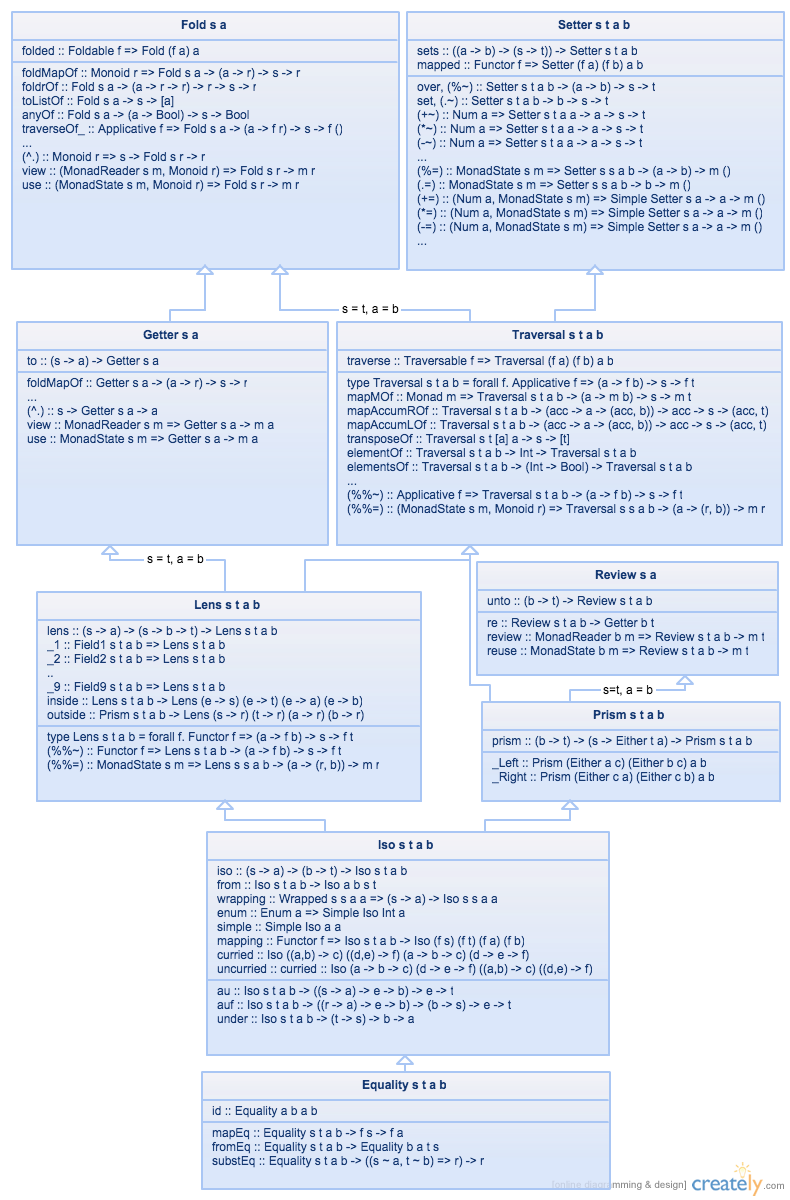
Section titled “Next Steps”There are plenty of more useful operators and optics in Lens. If you’re hungry for more, here’s more lens material from around the web.
- Kmett’s cheat sheet in the lens wiki
- This cheat sheet has decent coverage, and answers a handful questions in one place.
- Quchen’s lens-infix-operators
article
- A concise break down of the reusable parts of lens operators - super useful and a quick read and reference. (Thanks to PinkyThePig on Reddit for this)
- Artyom’s Lenses over tea =
- Admittedly more lens implementation details than practical use - but perhaps that’s what you’re looking for!
- Gabriel Gonzales’s lens
tutorial
- A great tutorial for getting started with lenses.
- The Lens library’s Big PDF of the lens family
- The Lens library’s Readme walkthrough
- Wikibook lens chapter
Conclusion
Section titled “Conclusion”I hope this helped you on your Haskell journey! There is plenty more to cover in a follow up guide - if this was useful, let us know which concepts you’d like covered next.